Bug reports that arrive with the evidence attached.
I kept getting emails that said “the save button does nothing” and not much else. This is the piece that attaches everything I would otherwise have had to ask for.
bugbottle collects what the browser already knows at the moment someone notices: the path, the viewport, the console errors from the last few minutes, the element they point at, and a screenshot if you turn that on. It POSTs the lot as JSON to a route you wrote. No dashboard, no account, nothing in the middle. Your reports never touch my servers, because there are none.
Version 1.0.1, released 8 September 2026. Zero dependencies. What changed.
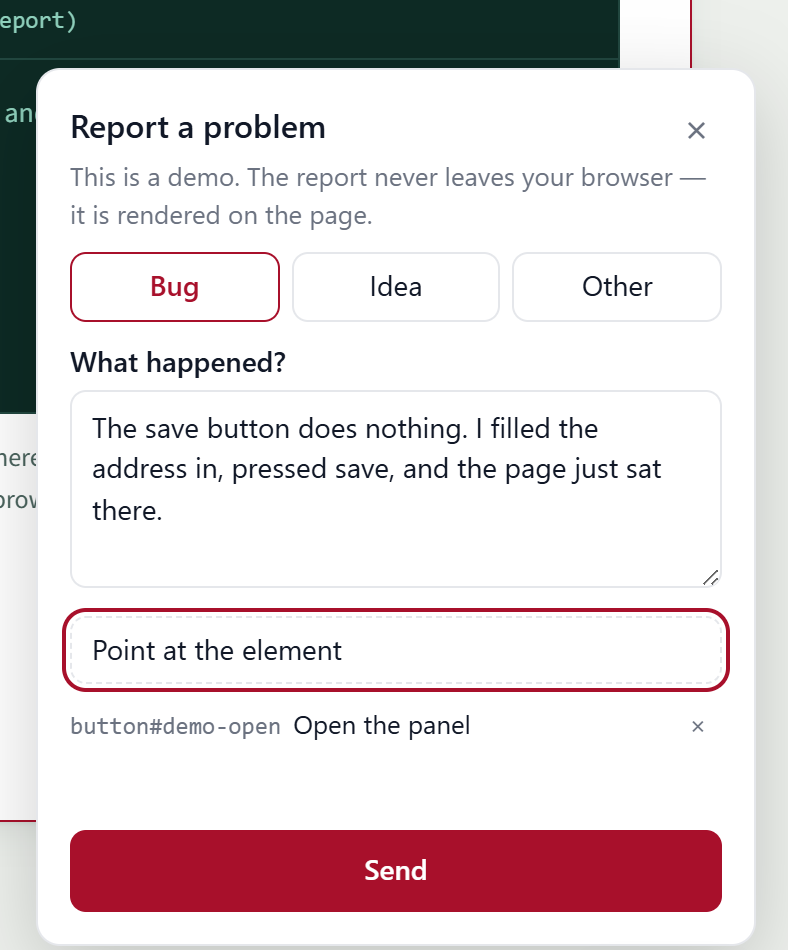
bugbottle/ui, captured on this page. The button in
the corner opens the same one.
What it does, and what it leaves to you
- You write the form
- The library holds the state, collects the evidence and makes the request. It renders nothing unless you ask for the ready-made panel.
- You own the endpoint
-
A report is a JSON body arriving at a route you wrote. There is nothing to
sign up for. The validators that check what arrives ship in
bugbottle/server. - It stays small
- No runtime dependencies, and one entry point per piece, so a page pays only for what it imports. The core is 1.4 kB gzipped. The table below has the rest.
- People can point
-
pickElement()returns a short CSS selector, the tag, the visible text and the position: enough for me, or for a coding agent, to open the right file rather than guess at it. - It speaks eight languages
- Danish, English, Swedish, Norwegian, German, Dutch, French and Spanish, with every string replaceable and the panel themed from a handful of CSS variables. The theme playground restyles a real panel while you move the controls and prints the code to paste.
- An outage does not lose the report
-
bugbottle/queuekeeps a failed send inlocalStorageand delivers it when the browser comes back. When the storage refuses the write, it drops the picture rather than the report and writes a line saying so, so nobody mistakes a lost screenshot for one that was never taken. When the network is down. - The server side trusts nothing
- Everything the browser sends is treated as hostile input: lengths clipped, null bytes stripped, and a screenshot checked by the signature in its decoded bytes rather than the type it claims to be.
- There is a checklist for the privacy question
- Every field a report can carry, what it holds, how long to keep it and a paragraph you can put in your own policy: the privacy checklist is written for whoever has to answer that question, and there is a Danish half of it for the site owner who has to sign it off.
Three ways to install it
All three post the same JSON to a route you write. Pick by what the project already has.
| Import | Gzipped |
|---|---|
| bugbottle | 1.4 kB |
| bugbottle/react | 5.7 kB |
| bugbottle/vue | 5.8 kB |
| bugbottle/svelte | 5.6 kB |
| bugbottle/solid | 5.7 kB |
| bugbottle/ui | 11.6 kB |
| bugbottle/annotate | 1.4 kB |
| bugbottle/breadcrumbs | 1.3 kB |
| bugbottle/network | 1.2 kB |
| bugbottle/perf | 1.3 kB |
| bugbottle/queue | 1.5 kB |
| bugbottle/queue-idb | 0.7 kB |
| bugbottle/triggers | 1.3 kB |
| bugbottle/shake | 0.7 kB |
| bugbottle/sign | 0.4 kB |
| bugbottle/rrweb | 0.7 kB |
| bugbottle/locales-extra | 4.7 kB |
| the script tag above | 24.6 kB |
| the same tag, bugbottle.slim.js | 21.0 kB |
Bundled with esbuild, minified, without html-to-image. CI fails the
build when they grow past the budget.
Rather build the form yourself? useBugReport from
bugbottle/react gives you the same core with none of the markup:
the README section on the form.
Nowhere to put the reports yet? Run the inbox: one container, one password.
examples/inbox
is a dependency-free Node server that receives reports, writes each one to
disk beside its picture and serves a read-only list behind
INBOX_PASSWORD. It ships with a Dockerfile and a
compose.yml, so a €4 VPS and a domain is the whole deployment.
Open the panel and read what it would have sent
The button in the corner is the real bugbottle/ui panel,
running from the same dist/ that npm ships. Open it, write a
line, point at something on this page, press send.
There is no endpoint behind it. The demo hands the library a
fetch of its own, keeps the body that would have been posted,
and renders it here with toMarkdown from
bugbottle/server, which is the same function you would use for
an issue body.
The picture is drawn, not captured. A real screenshot renders the page
through bugbottle/html-to-image, and this page has nowhere
private to put one, so the demo hands the panel a renderer that paints a
simplified picture of this section onto a canvas — a header band, some
text bars and the button. Attach it and "Edit picture" appears: that is
the real editor from bugbottle/annotate, with the rectangle,
the arrow and the blur.
The report, as Markdown
Nothing is sent. There is no endpoint on this host: the report is built and rendered in your browser, and closing the tab is the end of it. The picture the page drew, and whatever you mark on it, go the same way.
Eleven places a report can land
Storing a report is one thing; seeing it is another.
bugbottle/server ships eleven sinks — ten of them a formatter
over a single fetch, the eleventh a small SMTP client, none with
a dependency of its own:
- Resend
- SMTP
- Webhook
- Slack
- Discord
- Teams
- GitHub
- GitLab
- Jira
- Linear
- Sentry
None of them reads your environment: the key, the URL and the token are arguments, so the call site says where the secret came from and nothing can drift into a browser bundle. The table in the documentation has what each one needs, what a report turns into there, which of them you can self-host, and what importing it costs a server bundle.
Read this before you turn screenshots on
A screenshot of your application contains whatever the reporter could see. In a clinical system that can mean a patient photograph; in a payroll tool, a salary; in yours, perhaps somebody's inbox or a half-written message they had not sent yet.
Three things follow, and the library cannot do them for you:
- Put screenshots somewhere private. If your object storage bucket has a public read policy, and many media buckets do, anything you write to it can be fetched by anyone holding the URL. Use a separate bucket with no public policy.
- Serve them back through an authenticated route. Never give a screenshot a public URL. Look the storage key up from the row rather than taking it from the request, so an id cannot be used to walk your bucket.
- Say so before the picture is taken. Put it in the form, next to the checkbox, not in a policy nobody opens.
Requiring people to be signed in is worth considering too. An anonymous screenshot is one nobody can be asked about later, and nobody can be told has been deleted. The full section in the README.
Who writes this
I am Mads Holst Jensen, a freelance web and AI developer in Denmark, working under the name Mahope. bugbottle came out of two client applications whose users kept reporting things I could not reproduce. I built the part that collects the evidence, then took pieces out of it until it was small enough to give away.
I build this sort of thing for other people's products as well: the path a user takes when something is wrong, the internal tool nobody has had time for, the integration that has to keep working after I have gone. If that is what you are missing, write and tell me what it is.
Mads Holst Jensen mahoje.dk [email protected]